Parking Facility Surveillance System Design: Camera Coverage, Resolution, and Storage
Parking facility surveillance systems serve multiple functions: deterring criminal activity, documenting incidents for liability purposes, supporting revenue audit (capturing vehicle entry and exit at control points), and providing evidence for enforcement actions. The design requirements for each function differ, and a system optimized for one purpose may be inadequate for others.
This guide covers the technical design considerations for parking surveillance, from camera placement and resolution specifications to storage architecture and integration with access control systems.
Coverage Design Principles
Defining Coverage Objectives
Before specifying cameras, define what each camera zone must accomplish:
Deterrence coverage: Wide-field cameras visible to users — their presence deters opportunistic crime more than their resolution.
Identification coverage: Cameras capable of capturing identifiable facial or vehicle characteristics — require higher resolution and focused placement.
Documentation coverage: Recording activity at specific points (entrances, exits, payment stations) for audit and incident response — resolution requirements depend on the specific documentation need.
Operational monitoring: Wide-area views of parking levels for occupancy monitoring and real-time incident detection.
A complete surveillance design map specifies the objective for each camera location and the resolution and placement required to meet it.
Coverage Patterns
Entrance/exit coverage: Every vehicle entry and exit point requires camera coverage capturing the approaching vehicle, the vehicle occupant (where possible for identification purposes), and the license plate. LPR camera placement guidelines apply here, supplemented by general-purpose surveillance cameras with wider field of view for driver identification.
Walk path coverage: Pedestrian paths from parking areas to elevators, stairwells, and exits should be continuously covered. These areas are the highest-risk zones for personal safety incidents. Camera placement should minimize blind spots in pedestrian paths.
Payment station coverage: Pay stations are high-value targets for skimmer installation and vandalism, and transaction disputes benefit from recorded video. Camera coverage should capture a clear view of the payment interaction zone without capturing PAN (primary account number) data from card transactions.
Perimeter coverage: For open surface lots, perimeter coverage detects unauthorized vehicle access. For structured parking, perimeter includes pedestrian entry points, elevators, and stairwell entrances.
Resolution Specifications
Resolution Requirements by Application
Resolution in surveillance is typically discussed in terms of pixels-per-foot (ppf) at the subject distance. Industry guidelines from organizations like ASIS International provide reference points:
- Detection (object present): 12 ppf minimum — detect that something is in the frame
- Recognition (vehicle type, approximate appearance): 25 ppf — recognize what type of object is present
- Identification (facial or plate identification): 40–80 ppf — identify specific individuals or plate numbers
For a parking facility, entrance cameras focused on license plates should meet LPR-level ppf requirements (see LPR camera specification resources for detailed guidance). Facial identification cameras at pedestrian entry points typically require 80+ ppf at the identification distance.
Megapixel implications: At a 15-foot identification distance with a 40-ppf requirement, the required horizontal resolution is 40 × 15 = 600 pixels across the width of the monitored zone. A 1080p (1920 × 1080) camera with appropriate lens and field of view can achieve this. Wide-area overview cameras covering large parking levels can achieve lower ppf with the same resolution due to larger fields of view.
H.265/HEVC vs. H.264 Compression
Modern surveillance cameras support H.265 (HEVC) compression that typically reduces storage requirements by 40–50% compared to H.264 at equivalent quality. For large parking facility deployments with extended retention requirements, H.265 support in cameras and the video management system (VMS) is a significant storage cost reduction.
Storage Architecture
Storage Calculation
Storage requirements for parking surveillance depend on:
- Number of cameras
- Per-camera resolution and frame rate
- Compression codec and quality setting
- Retention period
- Motion-detection recording vs. continuous recording
Approximate storage consumption (H.265, continuous recording):
- 1080p at 15fps: 1–2 GB/day per camera
- 1080p at 30fps: 2–4 GB/day per camera
- 4K at 15fps: 4–8 GB/day per camera
For a 50-camera system retaining 30 days at 1080p/15fps: 50 × 1.5 GB × 30 = 2.25 TB minimum, with 30–50% overhead for a realistic usable storage requirement of 3–4 TB.
NVR vs. Server-Based VMS
Network Video Recorders (NVRs) are purpose-built appliances that combine recording, storage, and basic management in a single unit. They are cost-effective for smaller deployments (16–64 cameras) and require less IT expertise to operate.
Server-based VMS platforms (Milestone XProtect, Genetec Security Center, Axis Camera Station, etc.) run on standard server hardware and provide more sophisticated analytics, larger camera counts, and enterprise management features. For parking facilities with 50+ cameras or integration requirements with access control and parking management platforms, server-based VMS is the appropriate architecture.
Redundancy and Failover
Surveillance storage failures mean gaps in recorded video — potentially critical gaps if an incident occurs during a storage outage. Minimum redundancy for revenue parking facilities:
RAID storage: RAID 5 or RAID 6 configurations in the NVR/server protect against single-drive failure without data loss. For systems where any gap is unacceptable, RAID 6 (tolerates two simultaneous drive failures) provides higher protection.
Edge recording as backup: IP cameras with onboard storage (SD card) can record locally when the primary NVR/VMS is unavailable, providing a fallback recording that syncs to the central system when connectivity is restored.
Video Management System Features for Parking
VMS-PARCS Integration
Integrating the VMS with the parking management system enables camera views associated with specific transaction events — clicking on a disputed exit transaction pops up the camera view from the exit lane at the transaction timestamp. This dramatically reduces the time required to investigate disputes and audit transactions.
Analytics for Parking Applications
Modern VMS platforms support embedded video analytics:
License plate recognition: Some VMS platforms include or integrate LPR as a camera analytics function, eliminating the need for a separate LPR server.
Loitering detection: Detection of individuals remaining in a zone beyond a threshold time, relevant for security applications in parking structures.
Wrong-way vehicle detection: Cameras at one-way lanes can detect vehicles traveling against traffic flow.
Virtual tripwires: Alerts generated when a virtual line in the camera view is crossed — useful for detecting after-hours entry to a secured area.
FAQ
How long should parking facility surveillance footage be retained? ASIS International recommends 30–90 days as a baseline for general surveillance video, with longer retention for specific incidents under investigation. Incident footage should be preserved until legal proceedings related to the incident are complete. Check local regulations — some jurisdictions have minimum retention requirements for surveillance systems in public accommodations.
Should parking operators use cloud-based video storage? Cloud video storage (VSaaS — Video Surveillance as a Service) eliminates on-site storage hardware and provides off-site redundancy. For parking facilities with reliable internet connectivity, cloud storage is viable for smaller camera counts. High-bandwidth camera systems (4K, high frame rate) may require substantial bandwidth for cloud upload. Hybrid approaches — edge recording for recent video with selective cloud backup — balance cost and access.
What are the privacy disclosure requirements for surveillance cameras in parking facilities? Most US jurisdictions require conspicuous posting of notice that surveillance cameras are in use. The specific requirements vary by state and facility type. Some states restrict where cameras can be placed (restrooms, private areas). Consult applicable state law and facility type regulations for specific requirements. Signage should be placed at all facility entrances and in clearly visible locations throughout the facility.
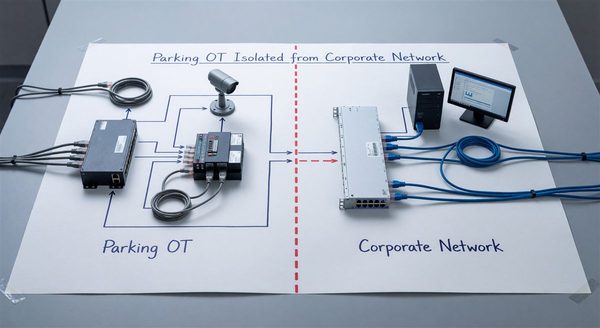
How should parking facility operators manage camera system cybersecurity? IP cameras are frequently exploited in network attacks due to default credentials and unpatched firmware. Change all default credentials before deployment; maintain a firmware update schedule; isolate cameras on a dedicated VLAN with no direct internet access; and disable unused network services on each camera. The ONVIF security advisory resources provide specific guidance on IP camera hardening.